# Can’t fill in gap in generated offset edges
**URL:** https://discourse.shapr3d.com/t/can-t-fill-in-gap-in-generated-offset-edges/5517
**Category:** Modeling Questions
**Created:** [September 1, 2019, 11:59pm UTC](https://discourse.shapr3d.com/t/can-t-fill-in-gap-in-generated-offset-edges/5517 "2019-09-01T23:59:40Z")
**Posts on this page:** 17
**Page:** 2
### Author:  [@DanielR](https://discourse.shapr3d.com/u/DanielR)
#### Post date: [September 28, 2019, 7:56am UTC](https://discourse.shapr3d.com/t/can-t-fill-in-gap-in-generated-offset-edges/5517/21 "2019-09-28T07:56:57Z")
Hi Larry - please allow us some time to investigate this. Probably we will need to tweak the tool a little bit, but I come up with a solution in the meantime
I’ve put a fillet on two edges. Please see picture below!

Offset the projected edges one, by one.

Would this be okay as an interim solution?
We will look into how we can improve the tool in the future
---
### Author:  [@DanielR](https://discourse.shapr3d.com/u/DanielR)
#### Post date: [September 28, 2019, 7:57am UTC](https://discourse.shapr3d.com/t/can-t-fill-in-gap-in-generated-offset-edges/5517/22 "2019-09-28T07:57:48Z")
Yes- that is correct. You have to export then import in order get one file into another.
---
### Author:  [@Larry](https://discourse.shapr3d.com/u/Larry)
#### Post date: [September 28, 2019, 4:48pm UTC](https://discourse.shapr3d.com/t/can-t-fill-in-gap-in-generated-offset-edges/5517/23 "2019-09-28T16:48:14Z")
thanks daniel, i think that will work for now. will you update this ticket when you have a more permanent solution?
---
### Author:  [@Larry](https://discourse.shapr3d.com/u/Larry)
#### Post date: [October 8, 2019, 9:30pm UTC](https://discourse.shapr3d.com/t/can-t-fill-in-gap-in-generated-offset-edges/5517/24 "2019-10-08T21:30:38Z")
hi daniel
finally had some time to keep working on it, but didnt get far… i’m hoping i’m missing something obvious.
i offset the edges piece by piece, as in this screenshot, but i cant select the areas between the outlines in order to raise/lower them.

tapping on an area between the outlines just selects the whole top - i want just the thin band between 2 outlines.
---
### Author:  [@Victor\_Shapr3D](https://discourse.shapr3d.com/u/Victor_Shapr3D)
#### Post date: [October 9, 2019, 8:07am UTC](https://discourse.shapr3d.com/t/can-t-fill-in-gap-in-generated-offset-edges/5517/25 "2019-10-09T08:07:47Z")
Hi Larry, thanks for getting back to us. Make a large zoom into that area between the outline and this will enable you precisely tap to select the area without selecting the whole surface. Let me know if this helps.
---
### Author:  [@Larry](https://discourse.shapr3d.com/u/Larry)
#### Post date: [October 9, 2019, 4:12pm UTC](https://discourse.shapr3d.com/t/can-t-fill-in-gap-in-generated-offset-edges/5517/26 "2019-10-09T16:12:28Z")
hi victor,
sadly that doesnt work. here’s a video of me trying to do that:[https://us1.discourse-cdn.com/flex002/uploads/shapr3d/original/2X/e/eabc7ff039d892b26e8fdcbe2e54955c29a44c5b.mp4](https://us1.discourse-cdn.com/flex002/uploads/shapr3d/original/2X/e/eabc7ff039d892b26e8fdcbe2e54955c29a44c5b.mp4)
---
### Author:  [@Victor\_Shapr3D](https://discourse.shapr3d.com/u/Victor_Shapr3D)
#### Post date: [October 9, 2019, 5:00pm UTC](https://discourse.shapr3d.com/t/can-t-fill-in-gap-in-generated-offset-edges/5517/27 "2019-10-09T17:00:43Z")
Hi Larry, please can you send us the design file via [support@shapr3d.com](mailto:support@shapr3d.com). We will further look into the issue and then get back to you as soon as possible.
---
### Author:  [@Larry](https://discourse.shapr3d.com/u/Larry)
#### Post date: [October 9, 2019, 5:02pm UTC](https://discourse.shapr3d.com/t/can-t-fill-in-gap-in-generated-offset-edges/5517/28 "2019-10-09T17:02:18Z")
i dont have pro. last time they enabled me for 1 day so i could export it.
---
### Author:  [@Victor\_Shapr3D](https://discourse.shapr3d.com/u/Victor_Shapr3D)
#### Post date: [October 9, 2019, 5:56pm UTC](https://discourse.shapr3d.com/t/can-t-fill-in-gap-in-generated-offset-edges/5517/29 "2019-10-09T17:56:57Z")
You should be able to export and send the workspace now 🙂
---
### Author:  [@Larry](https://discourse.shapr3d.com/u/Larry)
#### Post date: [October 9, 2019, 6:04pm UTC](https://discourse.shapr3d.com/t/can-t-fill-in-gap-in-generated-offset-edges/5517/30 "2019-10-09T18:04:26Z")
huh, nope. i tried quitting and restarting shapr3d, still wont let me export (still says ‘unlock all features go pro’ at the top)
---
### Author:  [@DanielR](https://discourse.shapr3d.com/u/DanielR)
#### Post date: [October 9, 2019, 6:38pm UTC](https://discourse.shapr3d.com/t/can-t-fill-in-gap-in-generated-offset-edges/5517/31 "2019-10-09T18:38:52Z")
Please try again, now
---
### Author:  [@Larry](https://discourse.shapr3d.com/u/Larry)
#### Post date: [October 9, 2019, 6:54pm UTC](https://discourse.shapr3d.com/t/can-t-fill-in-gap-in-generated-offset-edges/5517/32 "2019-10-09T18:54:47Z")
working now, thank you. here’s the shapr file[raise-track.shapr](https://discourse.shapr3d.com/uploads/short-url/kIEN9SE1Sz8r2FI9kqrS2tEKmnb.shapr) (436 KB)
---
### Author:  [@DanielR](https://discourse.shapr3d.com/u/DanielR)
#### Post date: [October 9, 2019, 7:40pm UTC](https://discourse.shapr3d.com/t/can-t-fill-in-gap-in-generated-offset-edges/5517/33 "2019-10-09T19:40:56Z")
This is a rather awkward bug (still in the process of reporting it to the team) - after a single edge offset of the edges of a complex face, some of the arcs and lines won’t snap to each other
1. double tap on sketch (this select all connected sketches), and you see some of the arcs are not actually connected

2.Tap on the point, you will see there is no disjoint icon, just the lock.
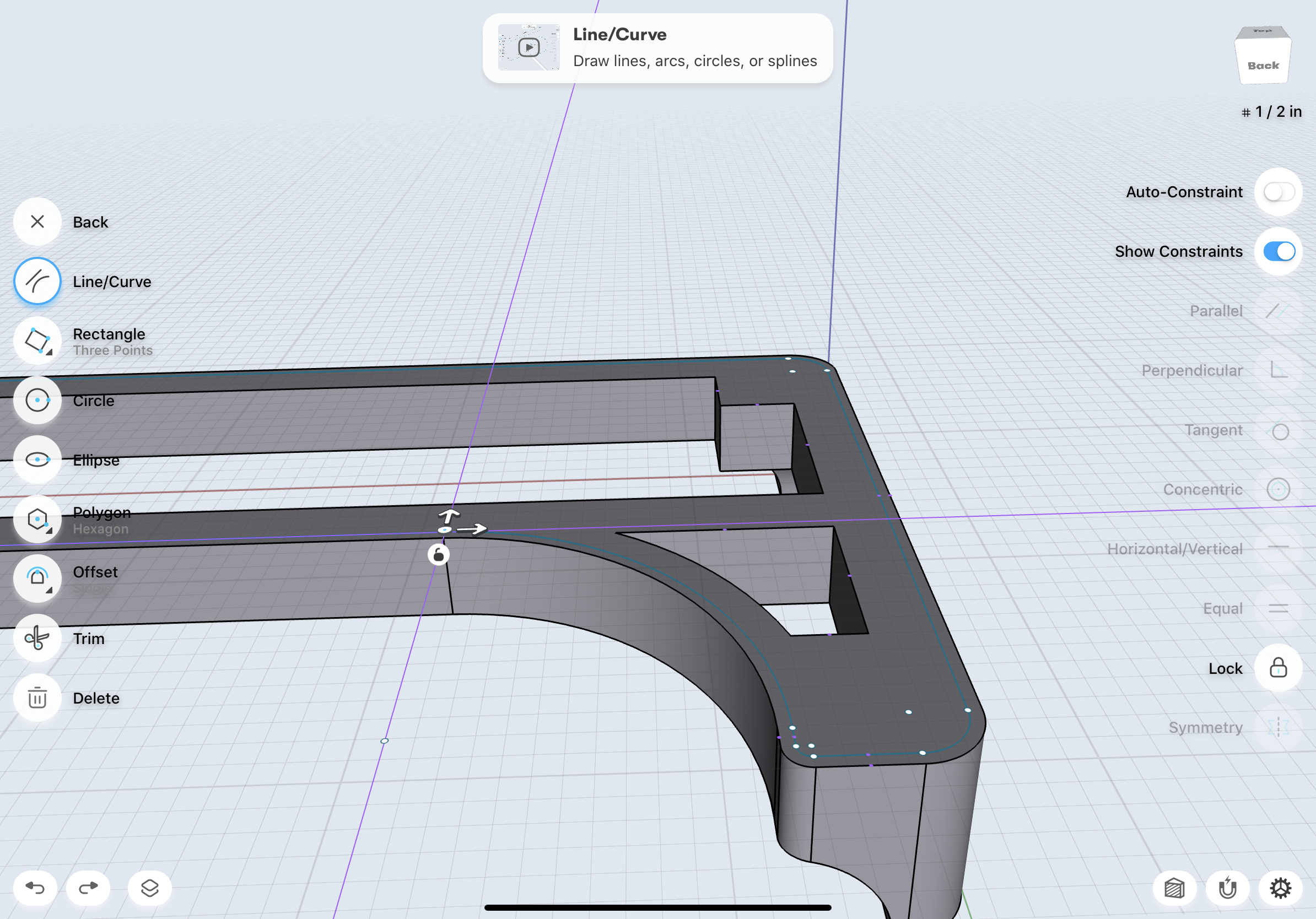
1. Move the line’s endpoint a bit further, than move it back to its original place - this way they will snap together. Please see attached video
[https://youtu.be/cknjwMRIXQo](https://youtu.be/cknjwMRIXQo)
2. This way the arc and line, will be joint - Repeat to all unconnected sketches
Sorry, about this experience, will report it to the dev team, and they will have a look.
---
### Author:  [@Larry](https://discourse.shapr3d.com/u/Larry)
#### Post date: [October 9, 2019, 8:13pm UTC](https://discourse.shapr3d.com/t/can-t-fill-in-gap-in-generated-offset-edges/5517/34 "2019-10-09T20:13:14Z")
thanks daniel! really appreciate the quick response and the video is super helpful.
i’m nearly there but not quite… i can make the segments join up like you describe, but i still cant select one side or the other, it still selects the whole surface. hopefully this is just me doing it wrong with the pen. i’ve attached a video of me double tapping the line and it selects the whole thing. then i try to select one side or the other and it doesnt work. also attached is the shapr file[single line but not separate surfaces.shapr](https://discourse.shapr3d.com/uploads/short-url/rorgT6UHbjgmBmOz4tIKWoyrWJd.shapr) (436 KB)
---
### Author:  [@Larry](https://discourse.shapr3d.com/u/Larry)
#### Post date: [October 9, 2019, 8:14pm UTC](https://discourse.shapr3d.com/t/can-t-fill-in-gap-in-generated-offset-edges/5517/35 "2019-10-09T20:14:22Z")
oops only attached the shapr, here’s the vidhttps://us1.discourse-cdn.com/flex002/uploads/shapr3d/original/2X/4/40f18c5232451c853c2d5fb3c2d2b76d67c22d3a.mp4
---
### Author:  [@DanielR](https://discourse.shapr3d.com/u/DanielR)
#### Post date: [October 9, 2019, 8:27pm UTC](https://discourse.shapr3d.com/t/can-t-fill-in-gap-in-generated-offset-edges/5517/36 "2019-10-09T20:27:23Z")
See pic - there was one arc - line connection that was not snapped

---
### Author:  [@Larry](https://discourse.shapr3d.com/u/Larry)
#### Post date: [October 9, 2019, 8:30pm UTC](https://discourse.shapr3d.com/t/can-t-fill-in-gap-in-generated-offset-edges/5517/37 "2019-10-09T20:30:38Z")
thank you!
[Previous page](https://discourse.shapr3d.com/t/can-t-fill-in-gap-in-generated-offset-edges/5517.md?page=1)