# Drawing onto complex model + extrude - no subtract
**URL:** https://discourse.shapr3d.com/t/drawing-onto-complex-model-extrude-no-subtract/12352
**Category:** Modeling Questions
**Created:** [April 19, 2021, 8:28pm UTC](https://discourse.shapr3d.com/t/drawing-onto-complex-model-extrude-no-subtract/12352 "2021-04-19T20:28:50Z")
**Posts on this page:** 4
**Page:** 1
### Author:  [@MarkL](https://discourse.shapr3d.com/u/MarkL)
#### Post date: [April 19, 2021, 8:28pm UTC](https://discourse.shapr3d.com/t/drawing-onto-complex-model-extrude-no-subtract/12352/1 "2021-04-19T20:28:50Z")
Hey guys!,
So quick little thing that bugs me as I do this 1000’s of times.
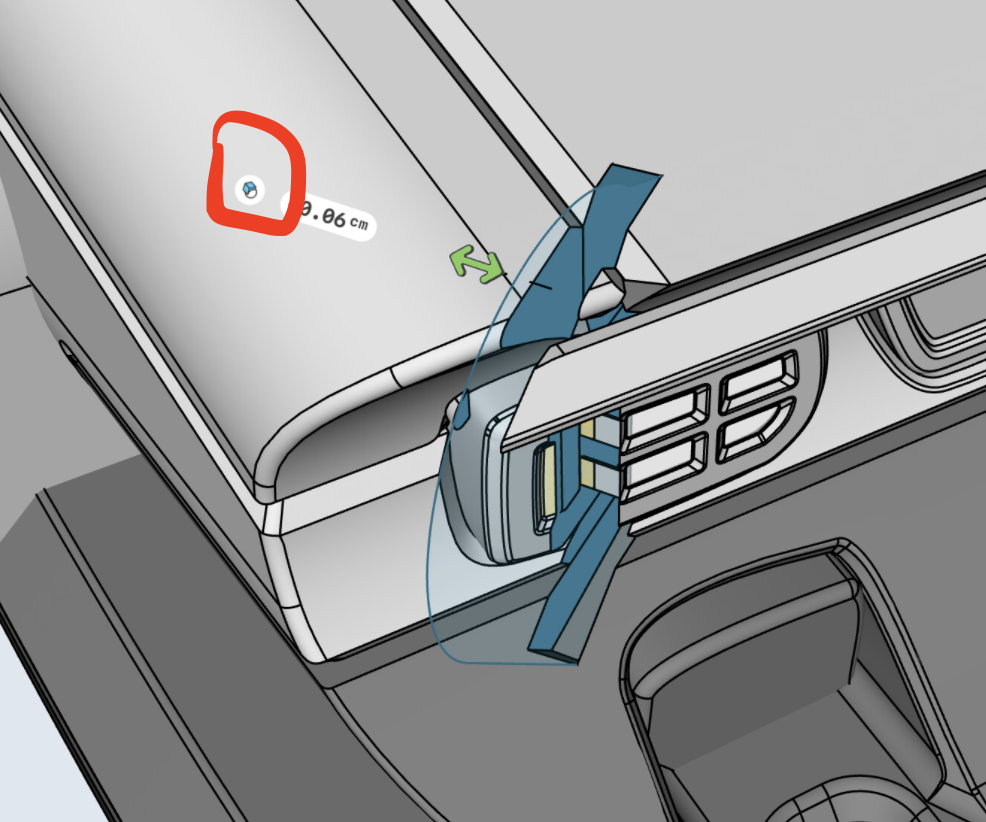
So I do tons of double-tap \> sketch on face \> push it extrude and the initial option is subtract.
At first glance not a big deal, but when i work on my bigger models it stalls for minutes. I have to : draw \> select the sketch \> pull it away from the model ( with the pivot readjusted on the face ) \> extrude away \> then move the new part back \> then perform the operation on the parts I’d like. Having it default to slice any object in front of it is a big slowing down factor in my workflow. Is there a preference setting to disable this or to default to always “new body” I prefer the choice and also it saves on by mistake slicing through my entire model. [image|666x500](https://discourse.shapr3d.com/uploads/short-url/gtN6EqCd7ymyeFrjaAsEsju9ZDZ.jpeg)
---
### Author:  [@DanielR](https://discourse.shapr3d.com/u/DanielR)
#### Post date: [April 19, 2021, 9:17pm UTC](https://discourse.shapr3d.com/t/drawing-onto-complex-model-extrude-no-subtract/12352/2 "2021-04-19T21:17:49Z")
Hello - there is such a thing 🙂 On your picture, check that badge next to the dimension, you can select the type of boolean you want (to overwrite the default)
---
### Author:  [@TigerMike](https://discourse.shapr3d.com/u/TigerMike)
#### Post date: [April 20, 2021, 1:54am UTC](https://discourse.shapr3d.com/t/drawing-onto-complex-model-extrude-no-subtract/12352/3 "2021-04-20T01:54:24Z")
Not sure if this is an issue for you, but when my workspace starts to grow with more content, it sometimes seems to bog down a bit. I have even seen an anomaly of reverse perspective when zooming in on some geometry details. For the iPad Pro version, I get out of Shapr3D and remove from the background. Then I start it up again and all seems to run smoothly.
---
### Author:  [@MarkL](https://discourse.shapr3d.com/u/MarkL)
#### Post date: [April 27, 2021, 12:43am UTC](https://discourse.shapr3d.com/t/drawing-onto-complex-model-extrude-no-subtract/12352/4 "2021-04-27T00:43:16Z")
Hey Daniel use that button all the time but it doesn’t set a new default. It always starts with subtract. How do I get it to use a new default?