# How to create a faded channel
**URL:** https://discourse.shapr3d.com/t/how-to-create-a-faded-channel/9472
**Category:** Modeling Questions
**Created:** [October 22, 2020, 1:24pm UTC](https://discourse.shapr3d.com/t/how-to-create-a-faded-channel/9472 "2020-10-22T13:24:43Z")
**Posts on this page:** 8
**Page:** 1
### Author:  [@Alano](https://discourse.shapr3d.com/u/Alano)
#### Post date: [October 22, 2020, 1:24pm UTC](https://discourse.shapr3d.com/t/how-to-create-a-faded-channel/9472/1 "2020-10-22T13:24:43Z")
Hey all,
This is a helmet shape. So how would you create this recess channel that fade/blends into the main curved surface? Thanks for your help!

`
---
### Author:  [@KPeter](https://discourse.shapr3d.com/u/KPeter)
#### Post date: [October 22, 2020, 2:34pm UTC](https://discourse.shapr3d.com/t/how-to-create-a-faded-channel/9472/2 "2020-10-22T14:34:28Z")
Hi,
1. Create a plane to draw the cross section of the deboss. If you project the helmets cross section on the plane, it is easier to create a tangent continuity.
2. Extrude (or loft/sweep is the deboss is not that simple) your cross section and use Difference.
---
### Author:  [@Alano](https://discourse.shapr3d.com/u/Alano)
#### Post date: [October 22, 2020, 2:48pm UTC](https://discourse.shapr3d.com/t/how-to-create-a-faded-channel/9472/3 "2020-10-22T14:48:56Z")
Hey thanks for the help. I’m new to Shapr. So you’re saying a horizontal cross section right?
Q: looking at the side view. There is a taper from the top to bottom. So the deboss shape needs to also taper, as oppose to a straight vertical extrude. How would you accomplish this? Thanks!
---
### Author:  [@Alano](https://discourse.shapr3d.com/u/Alano)
#### Post date: [October 22, 2020, 3:05pm UTC](https://discourse.shapr3d.com/t/how-to-create-a-faded-channel/9472/4 "2020-10-22T15:05:44Z")
Hey so I figured out how to make a cross section but how do you project the cross section?
Btw, brilliant solution to my problem!👍🏻😀
---
### Author:  [@KPeter](https://discourse.shapr3d.com/u/KPeter)
#### Post date: [October 22, 2020, 3:10pm UTC](https://discourse.shapr3d.com/t/how-to-create-a-faded-channel/9472/5 "2020-10-22T15:10:22Z")
That case extends the process with a few more steps 😃
First, create a copy of your helmet at the exact same place and hide it.
You should create a cross-section and get the edge of your workpiece on a specific plane. It can be done by splitting the helmet up into three sections with the Subtract command. The split can be done with two boxes extruded that way to cover the upper and lower section of the helmet, then use Subtract.
The middle section’s upper and lower planes are your sketch plane for the two cross section of the deboss shape for the Loft command. On those plane you will be able to tangent-snap your sketch to the edge of the middle piece. The lofted shape then can be subtracted from the original helmet shape.
Depending on the complexity of the shape, you may have to play some with the cross sections to get the desired result, but there is a way to do that .
(Or the simplest solution would be to project the contour of the deboss, extrude it inside the helmet (which is a cut), then move some of the inner edges of the extrusion back to the outer surface of the helmet. - it just popped up in my mind at the end of this post)
---
### Author:  [@KPeter](https://discourse.shapr3d.com/u/KPeter)
#### Post date: [October 22, 2020, 3:11pm UTC](https://discourse.shapr3d.com/t/how-to-create-a-faded-channel/9472/6 "2020-10-22T15:11:27Z")
Look for the Project command in the tools 😉you will have to define the sketch and the surface to project on and you are ready
---
### Author:  [@Alano](https://discourse.shapr3d.com/u/Alano)
#### Post date: [October 22, 2020, 5:01pm UTC](https://discourse.shapr3d.com/t/how-to-create-a-faded-channel/9472/7 "2020-10-22T17:01:59Z")
Hey there,
Thanks again for your help on this.
Hey so I made a sweep a d subtracted. How do you move/merge these two edges?

---
### Author:  [@KPeter](https://discourse.shapr3d.com/u/KPeter)
#### Post date: [October 23, 2020, 12:56pm UTC](https://discourse.shapr3d.com/t/how-to-create-a-faded-channel/9472/8 "2020-10-23T12:56:31Z")
With the Move/Rotate tool you can grab edges and faces to move:
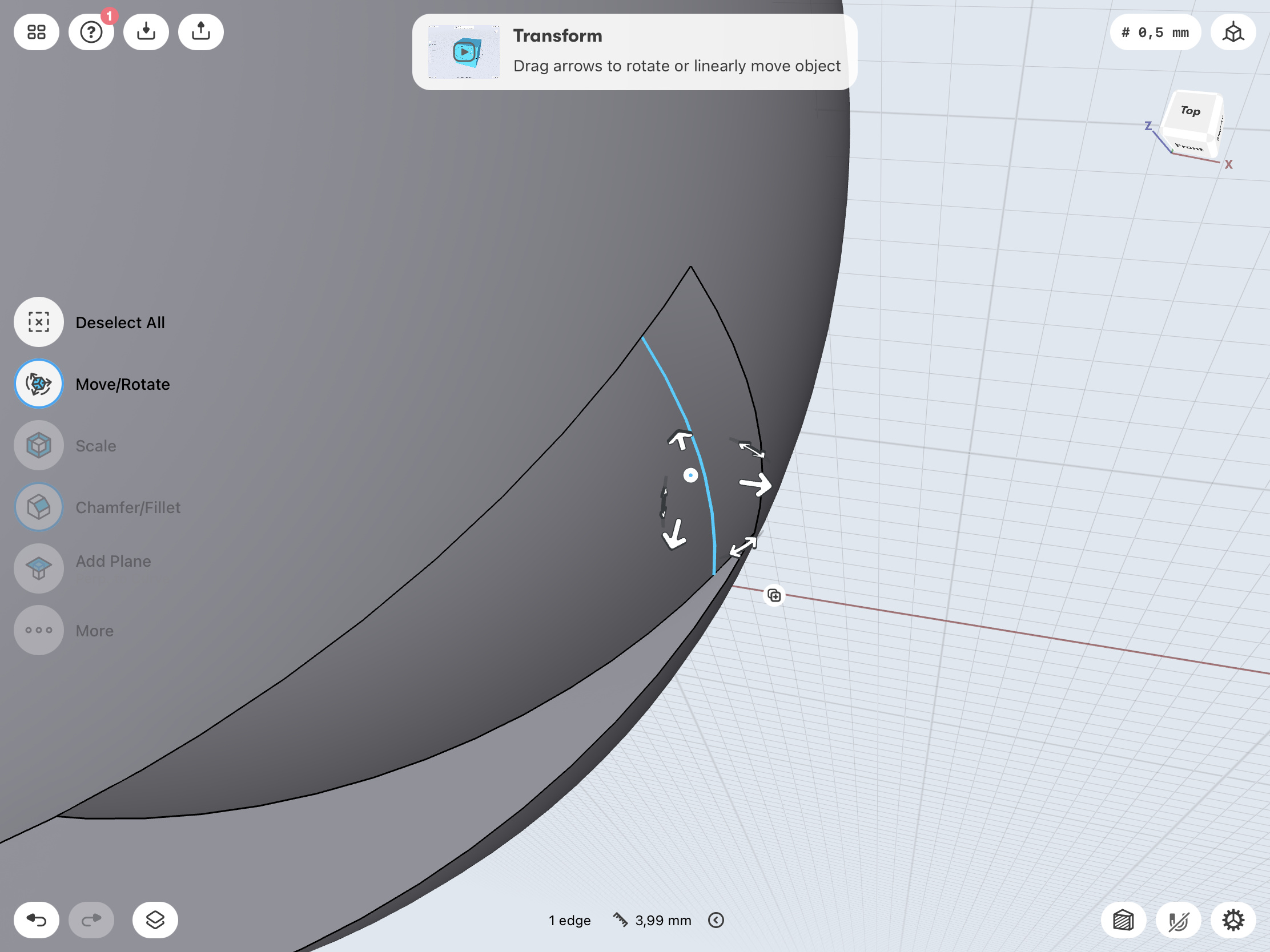
Have you used tangent snap between the curve of the cross section and the contour of your body? It may result in a much smoother connection that way