# How to get 2 different sketches on the same plane?
**URL:** https://discourse.shapr3d.com/t/how-to-get-2-different-sketches-on-the-same-plane/32828
**Category:** Modeling Questions
**Created:** [July 12, 2024, 7:03am UTC](https://discourse.shapr3d.com/t/how-to-get-2-different-sketches-on-the-same-plane/32828 "2024-07-12T07:03:18Z")
**Posts on this page:** 3
**Page:** 1
### Author:  [@Chiefslab](https://discourse.shapr3d.com/u/Chiefslab)
#### Post date: [July 12, 2024, 7:03am UTC](https://discourse.shapr3d.com/t/how-to-get-2-different-sketches-on-the-same-plane/32828/1 "2024-07-12T07:03:18Z")
Noob to shapr3d and still learning. I have 2 different sketches in a project. One of the sketches is above the origin and the other is below the origin. How can I move each back to the origin Z access?
I thought I could just move it and snap back to the origin, that does not work.
---
### Author:  [@rogerh](https://discourse.shapr3d.com/u/rogerh)
#### Post date: [July 12, 2024, 5:01pm UTC](https://discourse.shapr3d.com/t/how-to-get-2-different-sketches-on-the-same-plane/32828/2 "2024-07-12T17:01:08Z")
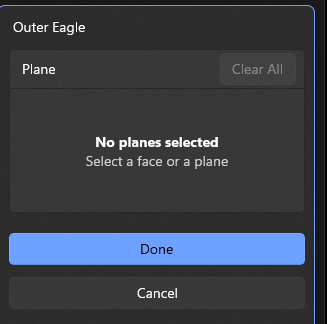
From the History tree, edit the sketch plane:

---
### Author:  [@Chiefslab](https://discourse.shapr3d.com/u/Chiefslab)
#### Post date: [July 22, 2024, 8:13pm UTC](https://discourse.shapr3d.com/t/how-to-get-2-different-sketches-on-the-same-plane/32828/3 "2024-07-22T20:13:30Z")
I selected both objects from the 2 different planes, Selected History, Clicked on One of the objects and selected Edit Plane and get No planes selected?