# How to (not) extrude 90° from a slope?
**URL:** https://discourse.shapr3d.com/t/how-to-not-extrude-90-from-a-slope/32280
**Category:** Modeling Questions
**Created:** [June 2, 2024, 1:24pm UTC](https://discourse.shapr3d.com/t/how-to-not-extrude-90-from-a-slope/32280 "2024-06-02T13:24:46Z")
**Posts on this page:** 13
**Page:** 1
### Author:  [@automatom](https://discourse.shapr3d.com/u/automatom)
#### Post date: [June 2, 2024, 1:24pm UTC](https://discourse.shapr3d.com/t/how-to-not-extrude-90-from-a-slope/32280/1 "2024-06-02T13:24:46Z")
So I drew a sketch on a slope that I need to extrude, but naturally it extrudes perpendicular to the angle of the slope. Is there a simple way of getting it to extrude perpendicular to another plane? Or am I going about it the wrong way with the sketch on slope method? I’ve marked the screenshot with the direction I would like it to extrude.
Thanks everyone

---
### Author:  [@APDesignMachine](https://discourse.shapr3d.com/u/APDesignMachine)
#### Post date: [June 2, 2024, 1:48pm UTC](https://discourse.shapr3d.com/t/how-to-not-extrude-90-from-a-slope/32280/2 "2024-06-02T13:48:19Z")
You can use sweep and select the edge on the right as the direction. You’ll just have to subtract the shape that’s created.
---
### Author:  [@automatom](https://discourse.shapr3d.com/u/automatom)
#### Post date: [June 2, 2024, 1:52pm UTC](https://discourse.shapr3d.com/t/how-to-not-extrude-90-from-a-slope/32280/3 "2024-06-02T13:52:08Z")
Worked a treat! thanks so much
---
### Author:  [@Bob3DPO](https://discourse.shapr3d.com/u/Bob3DPO)
#### Post date: [June 2, 2024, 1:56pm UTC](https://discourse.shapr3d.com/t/how-to-not-extrude-90-from-a-slope/32280/4 "2024-06-02T13:56:24Z")
Hi Tom,
You can’t change the basic extrude angle. But you can get your desired result without too much work. Here is one way of doing it. Project your sketch to the bottom face (the one you want to have the extrude perpendicular to), then extrude it. Change the extrude type from subtract to union or new body.
---
### Author:  [@automatom](https://discourse.shapr3d.com/u/automatom)
#### Post date: [June 2, 2024, 1:58pm UTC](https://discourse.shapr3d.com/t/how-to-not-extrude-90-from-a-slope/32280/5 "2024-06-02T13:58:25Z")
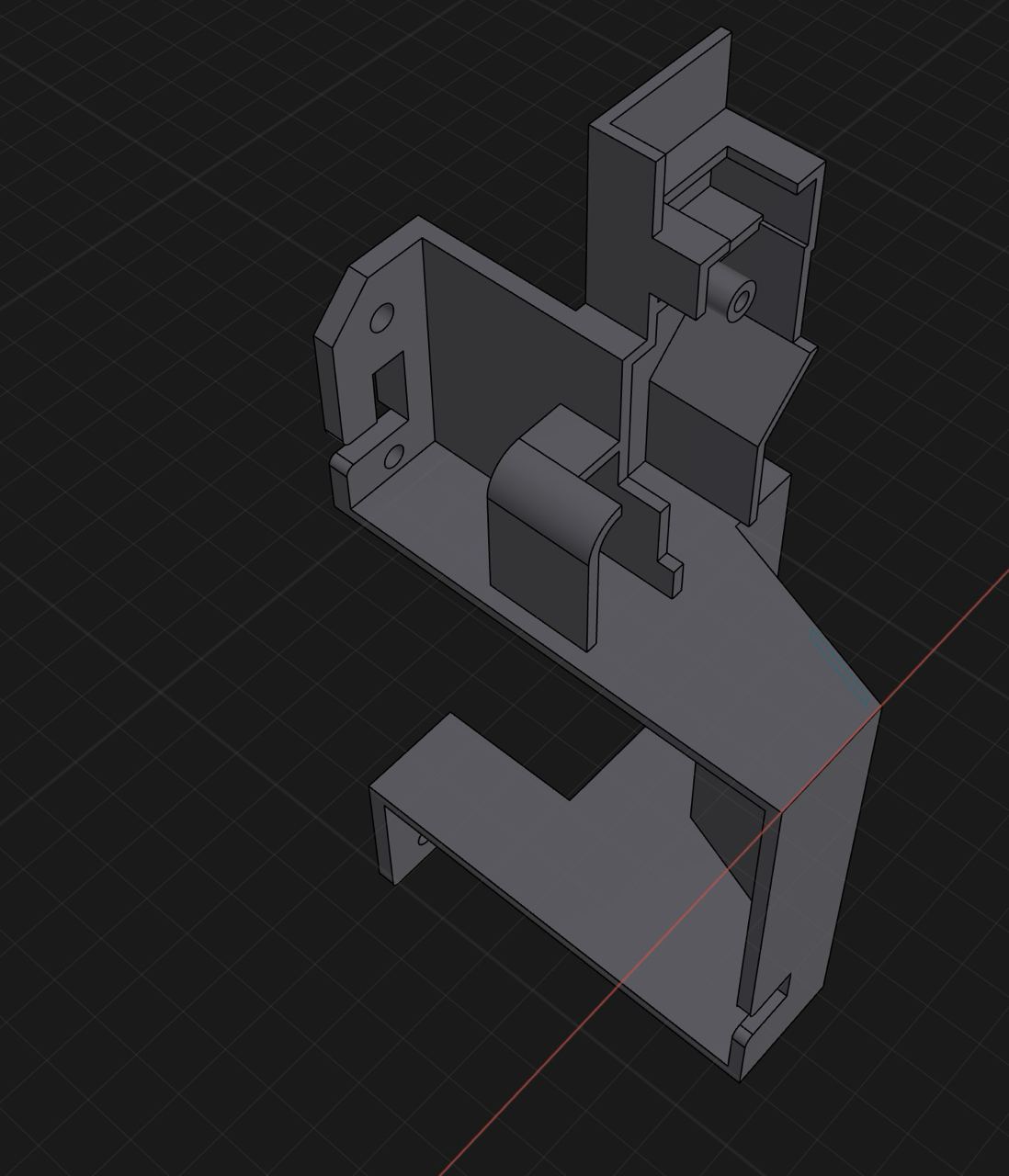
Hi Bob, I think I might have to go with this way because although I thought the above solution @APDesignMachine mentioned worked great, it has extruded underneath too
Will your method work because inside that sloped section is actually hollow, it has a shell of around 2mm
---
### Author:  [@Bob3DPO](https://discourse.shapr3d.com/u/Bob3DPO)
#### Post date: [June 2, 2024, 2:03pm UTC](https://discourse.shapr3d.com/t/how-to-not-extrude-90-from-a-slope/32280/6 "2024-06-02T14:03:16Z")
In that case, make the extrusion a New Body. Then use the sloped surface as the tool to split the new body, and delete the piece that is left inside your hollow.
---
### Author:  [@PEC](https://discourse.shapr3d.com/u/PEC)
#### Post date: [June 2, 2024, 2:09pm UTC](https://discourse.shapr3d.com/t/how-to-not-extrude-90-from-a-slope/32280/7 "2024-06-02T14:09:00Z")
Hi,
maybe you could use the loft tool?
---
### Author:  [@automatom](https://discourse.shapr3d.com/u/automatom)
#### Post date: [June 2, 2024, 2:15pm UTC](https://discourse.shapr3d.com/t/how-to-not-extrude-90-from-a-slope/32280/8 "2024-06-02T14:15:51Z")
Looks promising but it was all a bit too fast for me to follow. Did you use projection tool there also?
---
### Author:  [@PEC](https://discourse.shapr3d.com/u/PEC)
#### Post date: [June 2, 2024, 2:19pm UTC](https://discourse.shapr3d.com/t/how-to-not-extrude-90-from-a-slope/32280/9 "2024-06-02T14:19:57Z")
Hi
Yes I projected the first sketch to an horizontal surface to create the second sketch.
First click in the blue shape
Second click on the horizontal surface on the left
Third click on project tool
---
### Author:  [@automatom](https://discourse.shapr3d.com/u/automatom)
#### Post date: [June 2, 2024, 2:47pm UTC](https://discourse.shapr3d.com/t/how-to-not-extrude-90-from-a-slope/32280/10 "2024-06-02T14:47:34Z")
Ah I didn’t know you could project off another face like that. So good! It worked a treat thanks

---
### Author:  [@Bob3DPO](https://discourse.shapr3d.com/u/Bob3DPO)
#### Post date: [June 2, 2024, 3:08pm UTC](https://discourse.shapr3d.com/t/how-to-not-extrude-90-from-a-slope/32280/11 "2024-06-02T15:08:28Z")
Great solution!
---
### Author:  [@APDesignMachine](https://discourse.shapr3d.com/u/APDesignMachine)
#### Post date: [June 2, 2024, 3:12pm UTC](https://discourse.shapr3d.com/t/how-to-not-extrude-90-from-a-slope/32280/12 "2024-06-02T15:12:18Z")
> [@automatom](#):
>
> it has extruded underneath too
If it goes underneath (dunno why but I can’t see the file), you can just select the face underneath, the one you want it to match to and use replace face.
---
### Author:  [@automatom](https://discourse.shapr3d.com/u/automatom)
#### Post date: [June 2, 2024, 3:22pm UTC](https://discourse.shapr3d.com/t/how-to-not-extrude-90-from-a-slope/32280/13 "2024-06-02T15:22:01Z")
Thanks for all the help guys, @Bob3DPO you’re always a legend. All the solutions would’ve got me there in the end but @PEC’s was the most elegant. Appreciate you all