# Measurements between faces
**URL:** https://discourse.shapr3d.com/t/measurements-between-faces/9851
**Category:** Modeling Questions
**Created:** [November 23, 2020, 8:23pm UTC](https://discourse.shapr3d.com/t/measurements-between-faces/9851 "2020-11-23T20:23:34Z")
**Posts on this page:** 11
**Page:** 1
### Author:  [@Willis](https://discourse.shapr3d.com/u/Willis)
#### Post date: [November 23, 2020, 8:23pm UTC](https://discourse.shapr3d.com/t/measurements-between-faces/9851/1 "2020-11-23T20:23:34Z")
Hi, still fairly illiterate with shapr but loving the learning curve. Question: is there a way of measuring (and showing the figures) the space between two faces. Eg is it possible by tapping on 2 faces of opposing bodies that would quickly show the measurement of the space in between?
Perhaps there is a way and It seems that it should be an easy hit?
Will
---
### Author:  [@Istvan](https://discourse.shapr3d.com/u/Istvan)
#### Post date: [November 23, 2020, 9:12pm UTC](https://discourse.shapr3d.com/t/measurements-between-faces/9851/2 "2020-11-23T21:12:19Z")
Hey @Willis, welcome to the community. I am rally glad that you enjoy your first steps with Shapr3D.
Measurements appear in the bottom of the screen for selected objects, including faces:
[https://support.shapr3d.com/hc/en-us/articles/115001445613-Where-can-I-see-detailed-measurements-of-my-shapes-and-objects-](https://support.shapr3d.com/hc/en-us/articles/115001445613-Where-can-I-see-detailed-measurements-of-my-shapes-and-objects-)
---
### Author:  [@Ed3193](https://discourse.shapr3d.com/u/Ed3193)
#### Post date: [November 23, 2020, 9:12pm UTC](https://discourse.shapr3d.com/t/measurements-between-faces/9851/3 "2020-11-23T21:12:32Z")
Any answer?
---
### Author:  [@Willis](https://discourse.shapr3d.com/u/Willis)
#### Post date: [November 24, 2020, 7:30am UTC](https://discourse.shapr3d.com/t/measurements-between-faces/9851/4 "2020-11-24T07:30:36Z")
Thanks and that is a help. Screenshot of an example that would be useful if i could instantly see the m2 of ‘dead space’
 and measurements between the four faces selected
---
### Author:  [@KPeter](https://discourse.shapr3d.com/u/KPeter)
#### Post date: [November 24, 2020, 10:02am UTC](https://discourse.shapr3d.com/t/measurements-between-faces/9851/5 "2020-11-24T10:02:34Z")
Yeah, I see. At this time one possible way is to create a sketch by projecting those faces to a plane. If you select the enclosed cross-section, Shapr3D will tell you the area of the selected surface
---
### Author:  [@Beam](https://discourse.shapr3d.com/u/Beam)
#### Post date: [May 10, 2025, 2:58pm UTC](https://discourse.shapr3d.com/t/measurements-between-faces/9851/6 "2025-05-10T14:58:35Z")
I am not able to get the measured angle between two faces. I select the two faces but no measurements appear at the bottom of screen. I select measure tool and it only calculates the area. What am I doing wrong?

---
### Author:  [@Xdrakosha](https://discourse.shapr3d.com/u/Xdrakosha)
#### Post date: [May 10, 2025, 3:17pm UTC](https://discourse.shapr3d.com/t/measurements-between-faces/9851/7 "2025-05-10T15:17:55Z")
> [@Beam](#):
>
> I select the two faces but no measurements appear at the bottom of screen.
That can happen when two surfaces have different angles in different places.
For example:


---
### Author:  [@Beam](https://discourse.shapr3d.com/u/Beam)
#### Post date: [May 11, 2025, 12:20am UTC](https://discourse.shapr3d.com/t/measurements-between-faces/9851/8 "2025-05-11T00:20:17Z")
Ah, thanks. is there a way to manually measure angles on planes. I would not know how to go about this.
---
### Author:  [@jean-philippe2](https://discourse.shapr3d.com/u/jean-philippe2)
#### Post date: [May 11, 2025, 1:41am UTC](https://discourse.shapr3d.com/t/measurements-between-faces/9851/9 "2025-05-11T01:41:46Z")
[Xdrakosha](https://discourse.shapr3d.com/u/Xdrakosha) has shown you the way in his post above.
[ ](https://us1.discourse-cdn.com/flex002/uploads/shapr3d/original/3X/b/9/b9a262655d08da99af71a9fb209b620d8ecdcbcc.jpeg)
Select 2 edges \>

---
### Author:  [@kabocha](https://discourse.shapr3d.com/u/kabocha)
#### Post date: [May 11, 2025, 11:11am UTC](https://discourse.shapr3d.com/t/measurements-between-faces/9851/11 "2025-05-11T11:11:01Z")
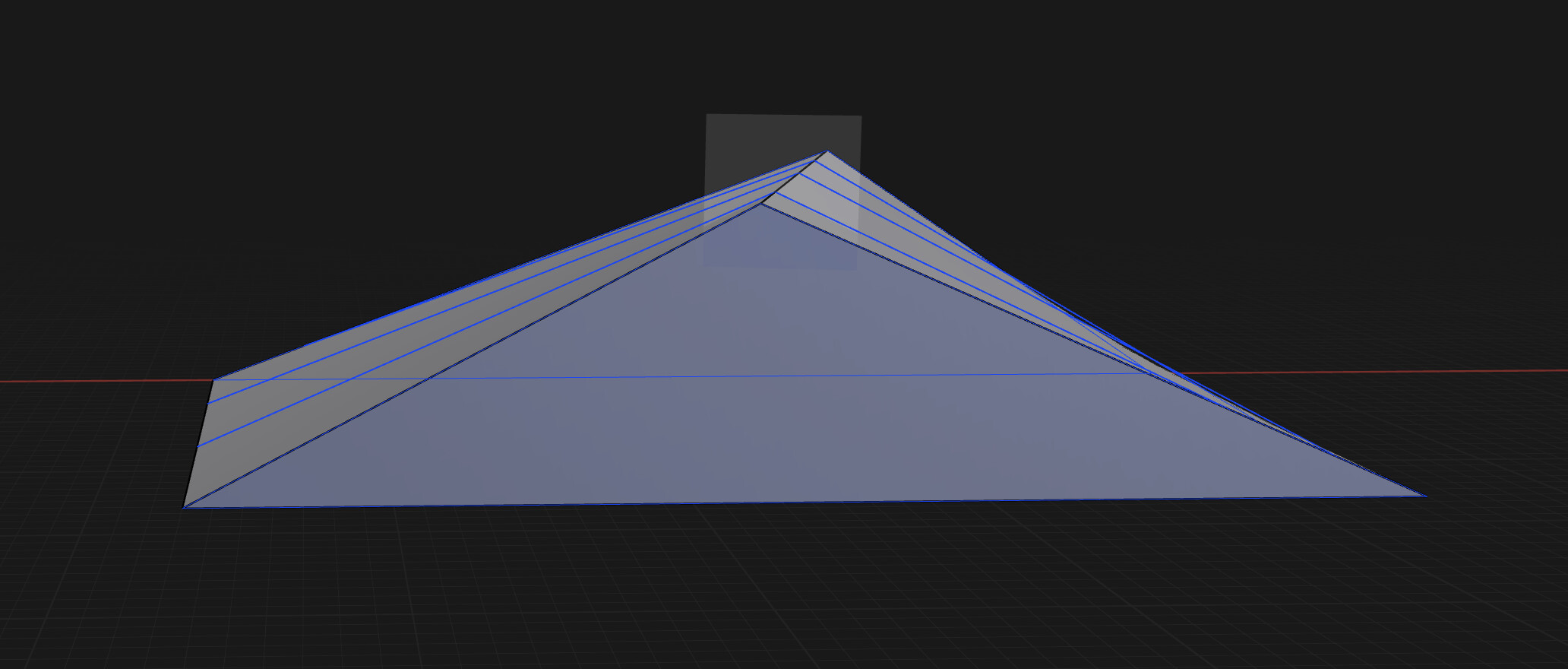
I see the issue, you can’t get the measurement because if it’s a roof your roof is warped so even if you can manually get the angle it will be all different based on where you get it from. I’m working on a house so that the comparison I think of.
More extreme example, I used the Perpendicular Edge Plane to draw the angle, since it’s warped angles are all different.
---
### Author:  [@Beam](https://discourse.shapr3d.com/u/Beam)
#### Post date: [May 11, 2025, 11:44pm UTC](https://discourse.shapr3d.com/t/measurements-between-faces/9851/12 "2025-05-11T23:44:20Z")
In my case the surface is not warped but the planes don’t have parallel edges. Thanks for letting me know about creating a plane(perpendicular to edge) to draw onto so that I could measure the edge manually. This is exactly what I needed to know.
