# Offset after full fillet
**URL:** https://discourse.shapr3d.com/t/offset-after-full-fillet/11874
**Category:** Modeling Questions
**Created:** [March 14, 2021, 1:13pm UTC](https://discourse.shapr3d.com/t/offset-after-full-fillet/11874 "2021-03-14T13:13:56Z")
**Posts on this page:** 4
**Page:** 1
### Author:  [@Liamwazzo](https://discourse.shapr3d.com/u/Liamwazzo)
#### Post date: [March 14, 2021, 1:13pm UTC](https://discourse.shapr3d.com/t/offset-after-full-fillet/11874/1 "2021-03-14T13:13:56Z")
Hello,
Apologies in advance if this has already been covered. I searched but could not identify keywords that provided a topic with solutions.
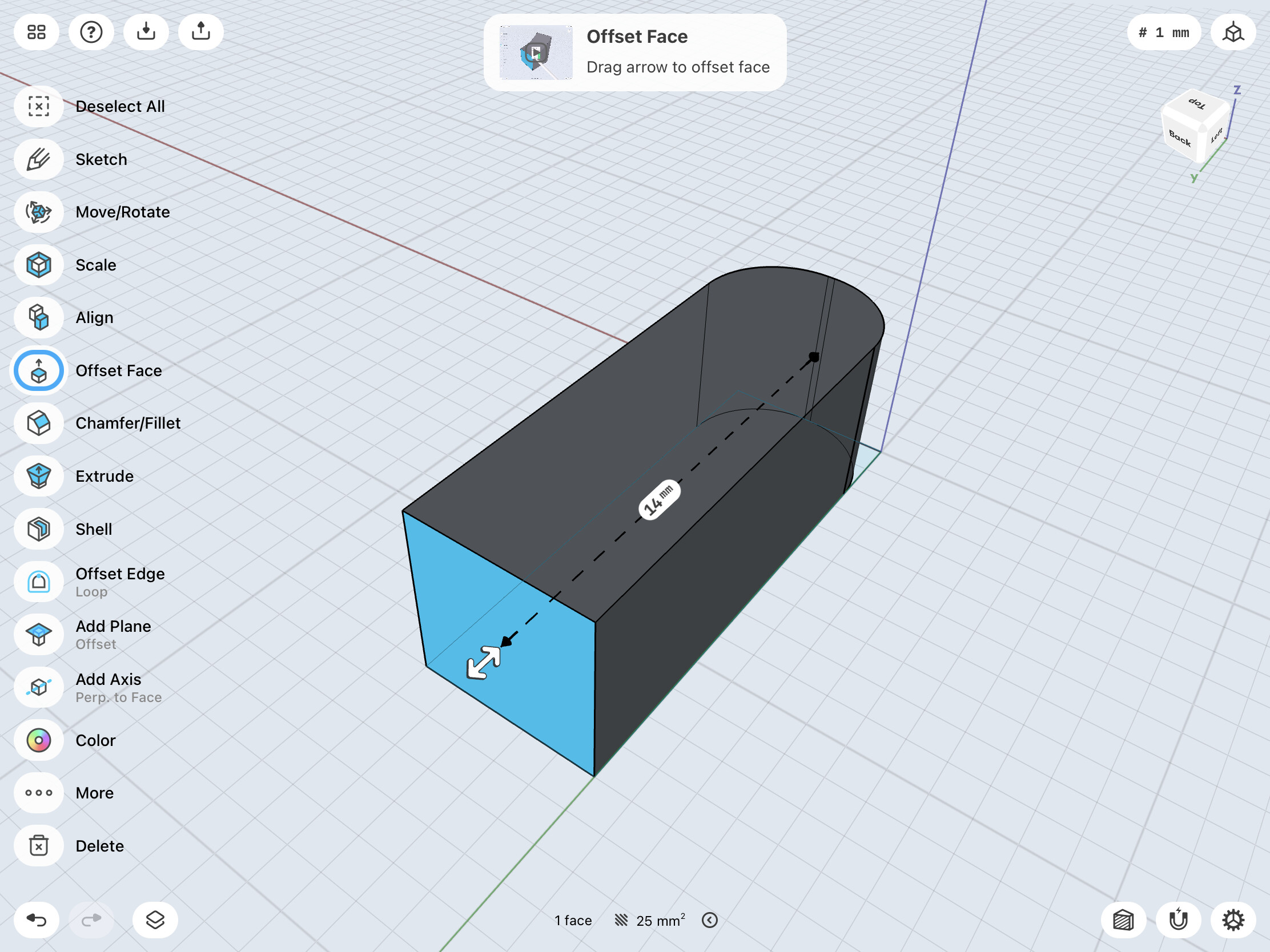
Situation: Adjusting a cuboid’s length via a face offset is clear and simple as there is a distance tag between the adjacent faces.
Issue: When fully filleting one of the faces the distance tag is gone [Image 2] (unless a small flat surface is left [Image 1]). This makes quick adjusts more tedious as I have to to first measure the length from the fillet line to the face, then mentally calculate the offset required.
This can become time consuming, especially with more complex designs.
Is there a solution or better workflow that improves this?
Thank you!
---
### Author:  [@Nitro](https://discourse.shapr3d.com/u/Nitro)
#### Post date: [March 14, 2021, 1:35pm UTC](https://discourse.shapr3d.com/t/offset-after-full-fillet/11874/2 "2021-03-14T13:35:22Z")
Such situations happen a lot.
The solution is tough:
> [@Direct modeling doesn't always work as it should](https://discourse.shapr3d.com/t/direct-modeling-doesnt-always-work-as-it-should/11058):
>
> Hello everybody I can no longer edit the ring in height if a 180 ° rounding has been made (inner and outer edge max. Rounded). The curves themselves can no longer be deleted. Even with surface projection, I can’t make the ring any higher. Is there a trick? Here is a video: [[Prop Schutz Shapr3D] ](https://www.youtube.com/watch?v=87pkW5K8iho)
---
### Author:  [@Liamwazzo](https://discourse.shapr3d.com/u/Liamwazzo)
#### Post date: [March 14, 2021, 1:57pm UTC](https://discourse.shapr3d.com/t/offset-after-full-fillet/11874/3 "2021-03-14T13:57:08Z")
Thank you for the link!
While similar, my main issue is the lack of a dimension tag from the flat side, not the inability to edit it.
I am still able to easily edit the flat side offset, unlike your model’s double ended 180º sides. The problem is that offsetting the flat surface restarts from 0.
---
### Author:  [@Nitro](https://discourse.shapr3d.com/u/Nitro)
#### Post date: [March 14, 2021, 3:56pm UTC](https://discourse.shapr3d.com/t/offset-after-full-fillet/11874/4 "2021-03-14T15:56:57Z")
Yes that is unfortunately so.
You can no longer delete the 180 ° radius so that you have a surface again.
With Shapr3D you have to be very sure that you really want 180 °, reuor is only possible with a lot of effort.
See the video that I made now.
[ ](https://www.youtube.com/watch?v=5OjIblX-b48)