# Quick Selection option
**URL:** https://discourse.shapr3d.com/t/quick-selection-option/31737
**Category:** Modeling Questions
**Created:** [May 7, 2024, 8:19am UTC](https://discourse.shapr3d.com/t/quick-selection-option/31737 "2024-05-07T08:19:49Z")
**Posts on this page:** 7
**Page:** 1
### Author:  [@porat\_m](https://discourse.shapr3d.com/u/porat_m)
#### Post date: [May 7, 2024, 8:19am UTC](https://discourse.shapr3d.com/t/quick-selection-option/31737/1 "2024-05-07T08:19:49Z")
Hey, I was wondering if there is an easy way to select only the sides of the items.
I thought I saw a tutorial video on YouTube where by holding the tab while selecting objects with the Apple Pencil it does the trick, but it doesn’t seem to work for me…
Thank you
Michael
---
### Author:  [@Istvan](https://discourse.shapr3d.com/u/Istvan)
#### Post date: [May 7, 2024, 8:41am UTC](https://discourse.shapr3d.com/t/quick-selection-option/31737/2 "2024-05-07T08:41:36Z")
With the Apple Pencil, when you are doing area selection, there is a selection filter while you drag the window. While you are dragging the window, with your other hand you can change the fitler.
---
### Author:  [@porat\_m](https://discourse.shapr3d.com/u/porat_m)
#### Post date: [May 7, 2024, 9:14am UTC](https://discourse.shapr3d.com/t/quick-selection-option/31737/3 "2024-05-07T09:14:04Z")
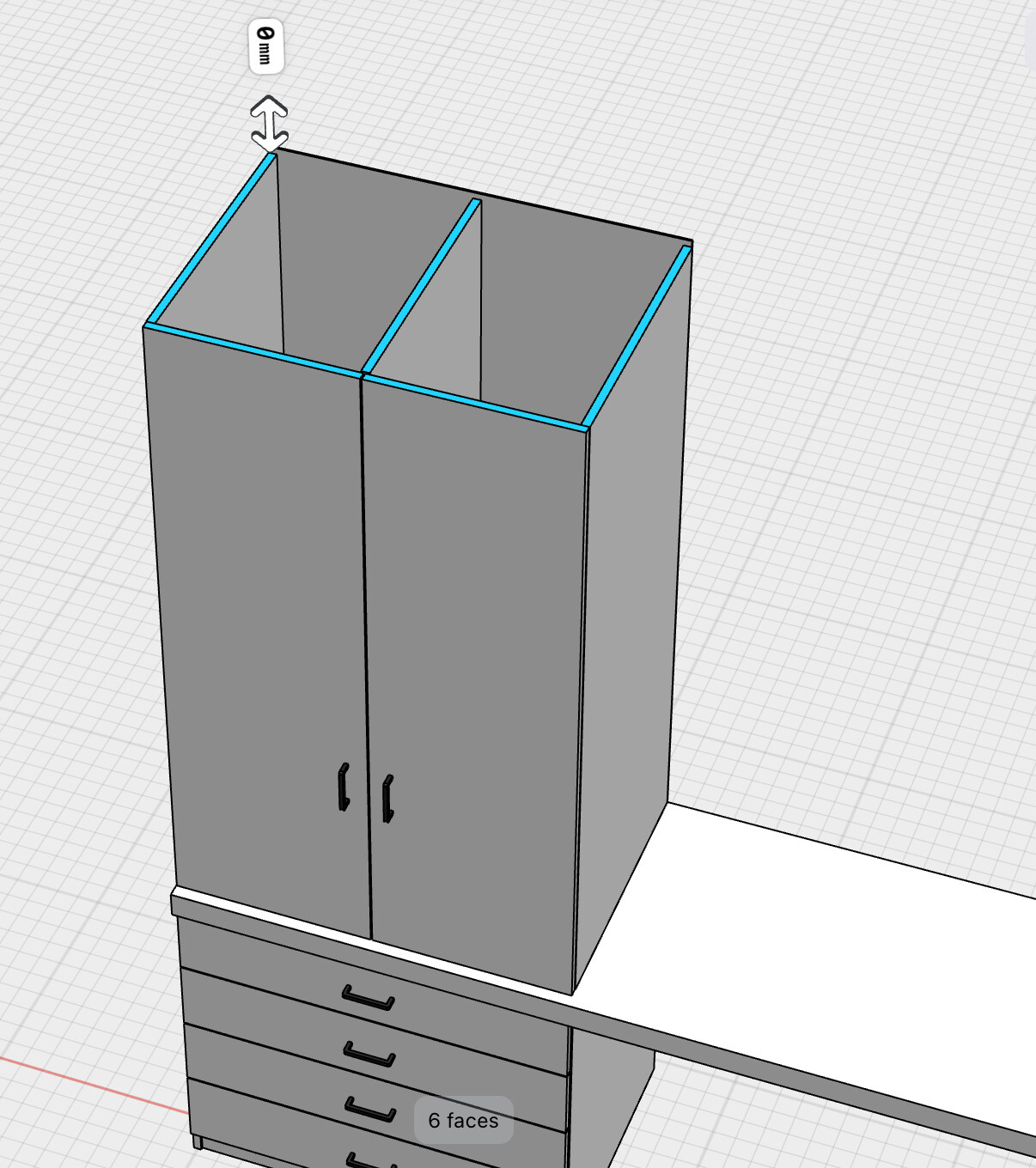
Thank you. I found it. The thing is if for example I just want to select the top faces (like the image I attached) in order to make a quick change to the height of the closet… but the selection tool also selects the front in the same selection. How can I choose only the top / front edges?
---
### Author:  [@Istvan](https://discourse.shapr3d.com/u/Istvan)
#### Post date: [May 7, 2024, 9:19am UTC](https://discourse.shapr3d.com/t/quick-selection-option/31737/4 "2024-05-07T09:19:12Z")
Using the area selection feature. I think this article might help.
> **[Selecting geometry](https://support.shapr3d.com/hc/en-us/articles/7770768736924-Selecting-geometry#selection-box-direction)**
>
> You can use a pen, mouse, or trackpad to select any geometry. There are various methods available for selecting geometry based on your input device and what you need to select.
> Menus are customize...
---
### Author:  [@porat\_m](https://discourse.shapr3d.com/u/porat_m)
#### Post date: [May 7, 2024, 9:35am UTC](https://discourse.shapr3d.com/t/quick-selection-option/31737/5 "2024-05-07T09:35:21Z")
I am only using Shapr3D with the iPad with Apple Pencil, and I just wanted a quick change to the height. I attached a video. Is there a way to do this selection quickly without selecting each face?
Thank you!
---
### Author:  [@Istvan](https://discourse.shapr3d.com/u/Istvan)
#### Post date: [May 7, 2024, 9:38am UTC](https://discourse.shapr3d.com/t/quick-selection-option/31737/6 "2024-05-07T09:38:50Z")
Like this:
https://www.loom.com/embed/c70c7b3f68f94e6abab5f13449c6f9db
---
### Author:  [@Do.B](https://discourse.shapr3d.com/u/Do.B)
#### Post date: [May 7, 2024, 1:18pm UTC](https://discourse.shapr3d.com/t/quick-selection-option/31737/7 "2024-05-07T13:18:56Z")
> [@Cap lock or middle button for multi-select](https://discourse.shapr3d.com/t/cap-lock-or-middle-button-for-multi-select/30336):
>
> Instead of having to hold the Shift key on the keyboard and click the left button of the mouse to make a selection of 2 or more, why not using the middle button/scrolling wheel button or the Cap Lock key? That way we can select stuff with one hand. Great when using space mouse. Thank you for reading my suggestion.