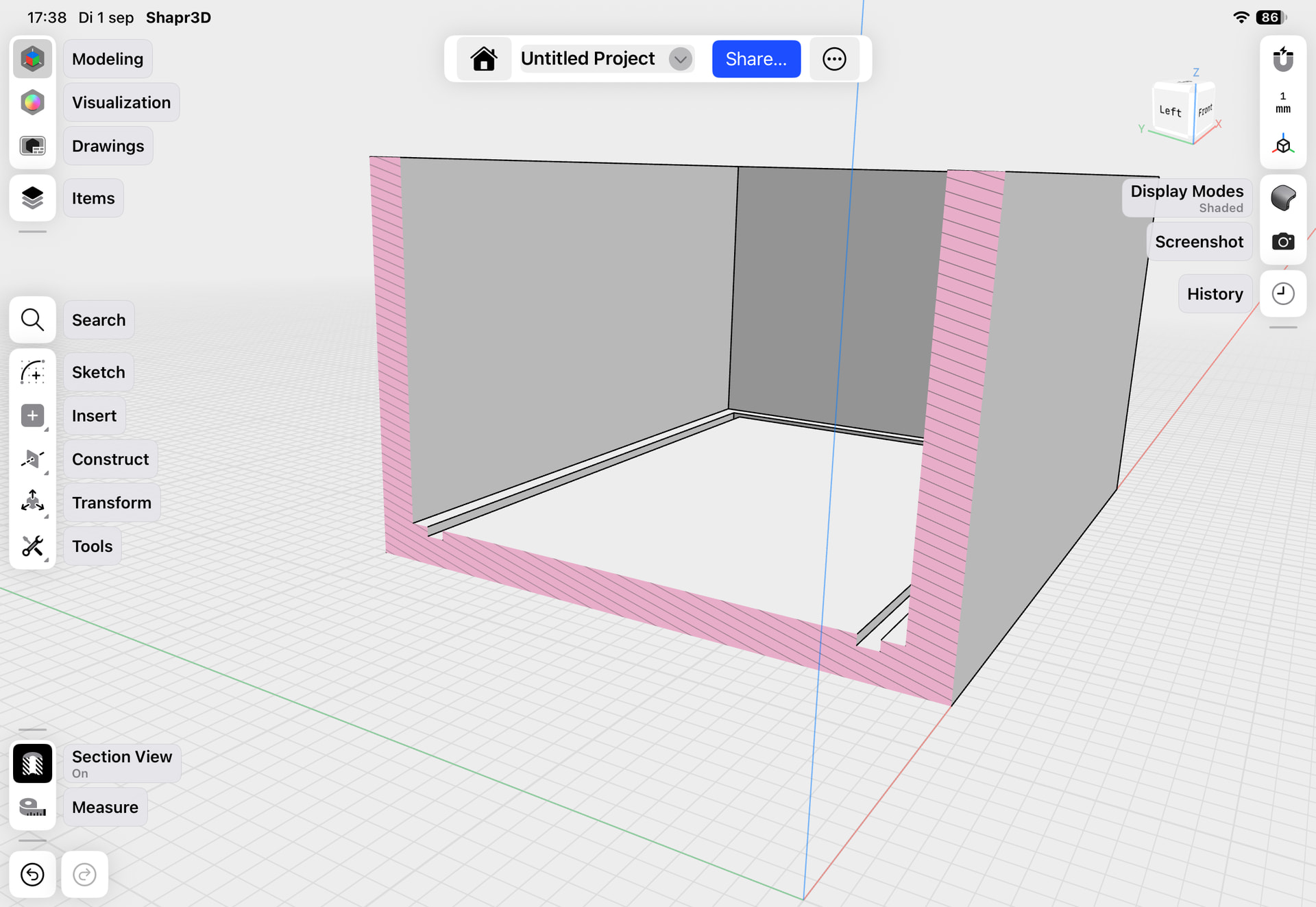
I designed this model in Shapr3D on my iPad. In the model, the side walls are completely straight and smooth.
However, when I print it on my Bambu Lab A1 mini, I always get a small indentation where the bottom transitions into the vertical walls (see photo). I’ve tried several different print profiles, but the result is basically the same every time.
Has anyone seen this before or have any suggestions on what could be causing it? Is there something I could change in the design, or is this more likely a slicer/printing issue?
That is called a “hull line”. This happens when the layer that is full filled out (the bottom of you tray) contracts a bit more than the section where there’s only walls on cooling.
A very common problem in FDM printing, not always that easy to solve.
I have made a second one. Used chamber and fillet at the bottom. I preferred the first one. Perhaps I should make the bottom much thinner and very little wider?
Thank you, Michel. Great tips! I will try that. I did remove the fillet inside the box, because I was afraid, the businesscards wouldn’t fit. The recess, are that two stripes, or four, like a square?
Making the bottom thinner will also help avoid that hull line. If you bottom is thin enough that there isn’t any infill between the bottom and top (only fully filled layers), the bed adhesion on your print will make your fully filled layer contract less aggressively. And you won’t have a shift from infill height to top layer height.
Another question: what if I dont use an infill but made the bottom fully filled layers, like you say with a thin bottom. Does that also work with a thicker bottom?
That depends how many fully filled layers you want to print. It quickly becomes a game of diminishing returns, as the contract forces will still make the full layers contract more than your container’s walls. The effect of the bed adhesion diminishes the higher you go.
You may also introduce another problem: warping. The more material you heap on, the more likely the piece will start to warp, to the point where it can bend itself off the plate.
PLA isn’t too problematic with this, it doesn’t warp a lot. With other filaments it’s something to keep an eye on, for example ABS is notorious for warping.
Thank you @michelpiazzini I made this model with your tips. Small lines in the bottom and a small fillet at the outside bottom. I am happy now. Thank you all so much. It was very helpful. I have placed it on
The other thing that would have possibly worked is to fillet the bottom inner edge, raise the center of the bottom and put vertical guides (2 per side).